MaxRewards vs Kudos: Which Is Better in 2026?
MaxRewards vs Kudos in 2026: compare pricing, platforms, offer activation, privacy, and which credit card rewards app fits online shoppers and rewards users.

MaxRewards and Kudos both promise to make credit card rewards less annoying. MaxRewards feels like a control center for your cards: offers, benefits, bills, balances, and recommendations in one app. Kudos feels more like a shopping wallet: it shows up at checkout, recommends a card, and stacks cash back. This MaxRewards vs Kudos comparison is for people who do not want another rewards app unless it actually removes work.
TL;DR
- MaxRewards: Best if your cards are spread across issuers and you want one mobile app for offers, benefits, bills, balances, and card value.
- Kudos: Best if most of your mistakes happen at checkout and you want card recommendations, autofill, cash back, and optional Premium automation.
- Choose MaxRewards if you keep forgetting to activate offers or check issuer apps.
- Choose Kudos if you shop online often and want help in the moment you are paying.
- If you also want automatic credit tracking and effective annual fee math, consider CardStack as the third tool in the stack, especially on iOS.
Feature Comparison
| Feature | MaxRewards | Kudos |
|---|---|---|
| Primary category | Credit card management app | Smart wallet and shopping rewards app |
| Best-card recommendations | Yes | Yes |
| Online checkout recommendations | Yes (browser extension) | Yes |
| Offer auto-activation | Yes | Yes |
| Supported offer issuers | Amex, Chase, Citi, Bank of America, Wells Fargo, Discover, and others | Amex, Chase, Citi, Bank of America, and more depending on feature |
| Bonus category auto-activation | Yes | Unclear |
| Credit / benefit tracking | Yes | Yes |
| Effective annual fee calculation | No | No |
| Bills, balances, and credit scores | Yes | Yes |
| Chrome extension | Yes | Yes |
| iOS | Yes | Yes |
| Android | Yes | Yes |
| Free tier | Yes | Yes |
| Premium pricing | Gold starts at $108/year, billed annually | Premium listed at $71.95-$71.99/year, $14.99/month, or $240 lifetime |
MaxRewards
MaxRewards is an iOS and Android credit card management app focused on rewards tracking, issuer account aggregation, offer activation, and card benefit tracking.
What it does best
MaxRewards makes the most sense when your rewards setup is already a little messy. You might have Amex Offers in one place, Chase Offers in another, rotating categories on a Freedom card, and balances spread across banks. MaxRewards puts that into one app instead of making you bounce between issuer logins.
The feature people usually mention first is offer activation. Manually adding every Amex, Chase, Citi, Bank of America, Wells Fargo, or Discover offer is the kind of chore rewards people pretend they will do every week, then stop doing. MaxRewards is built for that chore. It also has best-card recommendations, bonus category automation, benefit tracking, bills, balances, credit scores, and spending insights.
Platforms
MaxRewards is available on iOS and Android. It also has a browser extension for online shopping recommendations and offer activation.
Pricing
MaxRewards has a free tier. As of 2026, MaxRewards Gold starts at $9/month, billed annually at $108, according to the MaxRewards Help Center. Gold is the tier most people compare because it includes offer activation, Card Value, trackers, and benefits tracking. MaxRewards Platinum is more about business expense and receipt workflows.
Best for
MaxRewards is best for people who want a credit card command center on iOS or Android. If your biggest source of lost value is missed offers, forgotten rotating categories, or not knowing what is happening across issuer accounts, MaxRewards is the more natural fit.
Limitations
MaxRewards asks for a real privacy trade-off. Its privacy policy references issuer login information, and its Help Center explains how it encrypts credentials. Some people are fine with that because the automation is worth it. I would decide that before getting excited about the feature list.
MaxRewards also does not solve every premium-card management problem. It tracks benefits and card value, but it does not automatically calculate an effective annual fee the way a premium-card owner usually thinks about it: annual fee minus credits actually used.
Bottom line: MaxRewards is the better choice if you want a mobile card dashboard that does issuer syncing and offer activation better than a browser-first shopping tool.
Kudos
Kudos is a browser and mobile smart wallet focused on best-card recommendations, checkout autofill, shopping cash back, offer activation, bill negotiation, subscription cancellation, and spending insights.
What it does best
Kudos is strongest when you are about to buy something. You are on a checkout page, you have three cards that might make sense, and you do not want to open a spreadsheet or a bank app. Kudos pops into that moment with a card recommendation, autofill, offers, and Boost cash back where available.
Kudos has grown beyond a simple browser extension. The free product includes best-card recommendations, autofill, Boost cash back, benefits tracking, card discovery, and an offline Cheatsheet. Kudos Premium adds offer activation, bill negotiation, subscription cancellation, transaction history, insights, and welcome bonus tracking. The shopping use case is still the clearest one.
Platforms
Kudos is available as a browser extension and as mobile apps for iOS and Android. Kudos’ official Android launch copy says it also supports Chrome, Edge, and Safari desktop browsers.
Pricing
Kudos has a free tier for core checkout and wallet features. As of 2026, Kudos lists Premium at $71.95/year on its homepage, while some official pages and app listings show $71.99/year. Kudos also lists $14.99/month and a $240 lifetime Premium plan. Pricing changes, so check the current Kudos checkout screen before subscribing.
Best for
Kudos is best for online shoppers who want the app to show up while they are buying something. The free tier is compelling if you mainly want browser-based best-card recommendations, card autofill, shopping cash back, and a quick way to avoid using the wrong card at checkout.
Limitations
Kudos is not built around premium-card fee math. It can track benefits and help with offers, but it does not answer the keep-or-cancel question with an effective annual fee calculation. If you are deciding whether the Amex Platinum, Amex Gold, or Chase Sapphire Reserve is still worth paying for, Kudos is not the cleanest tool.
Kudos also has a broader product surface than some people want. Browser extension, cash back, card recommendations, bill negotiation, subscription cancellation, AI insights, and card discovery can all be useful, but they are not all the same job. If you only want issuer offer activation, MaxRewards may feel more direct.
Bottom line: Kudos is the better choice if you want a shopping-first tool that helps at checkout and does not require paying before the core product is useful.
Head-to-Head: Which Should You Choose?
I would choose based on where the friction shows up, not based on which product has more tabs.
| Your priority | Better fit |
|---|---|
| ”I want one app for my credit cards, balances, bills, and rewards” | MaxRewards |
| ”I want help at online checkout” | Kudos |
| ”I want offer activation across many issuer accounts” | MaxRewards |
| ”I want a strong free browser shopping tool” | Kudos |
| ”I care about Discover Deals and rotating categories” | MaxRewards |
| ”I want card autofill and shopping cash back” | Kudos |
| ”I want bill negotiation and subscription cancellation” | Kudos Premium |
| ”I want business spend and receipt workflows” | MaxRewards Platinum |
| ”I want effective annual fee math” | Neither, use CardStack or a spreadsheet |
| ”I want an Android-friendly rewards setup” | MaxRewards or Kudos, depending on shopping vs card management |
Where CardStack Fits
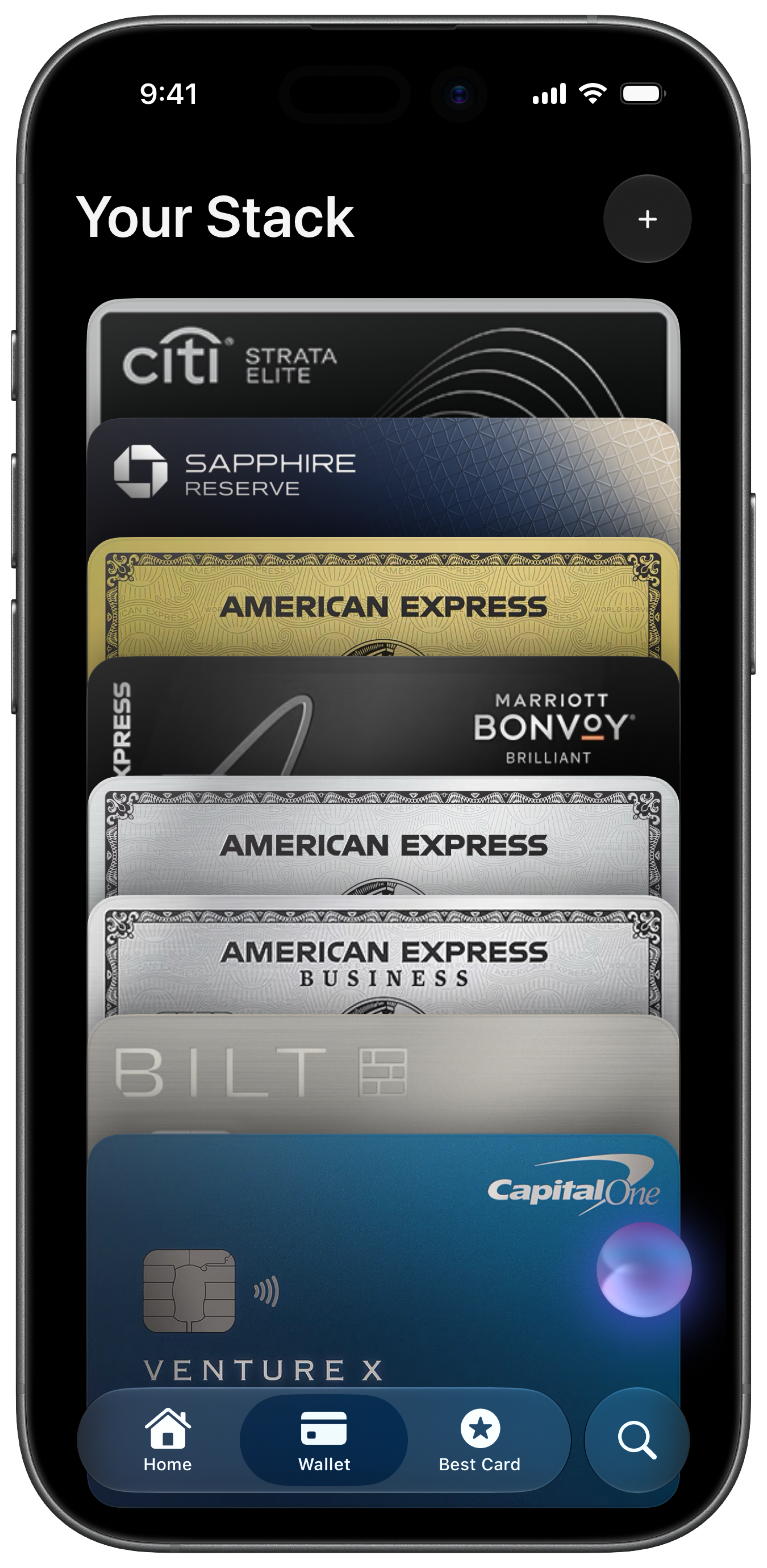
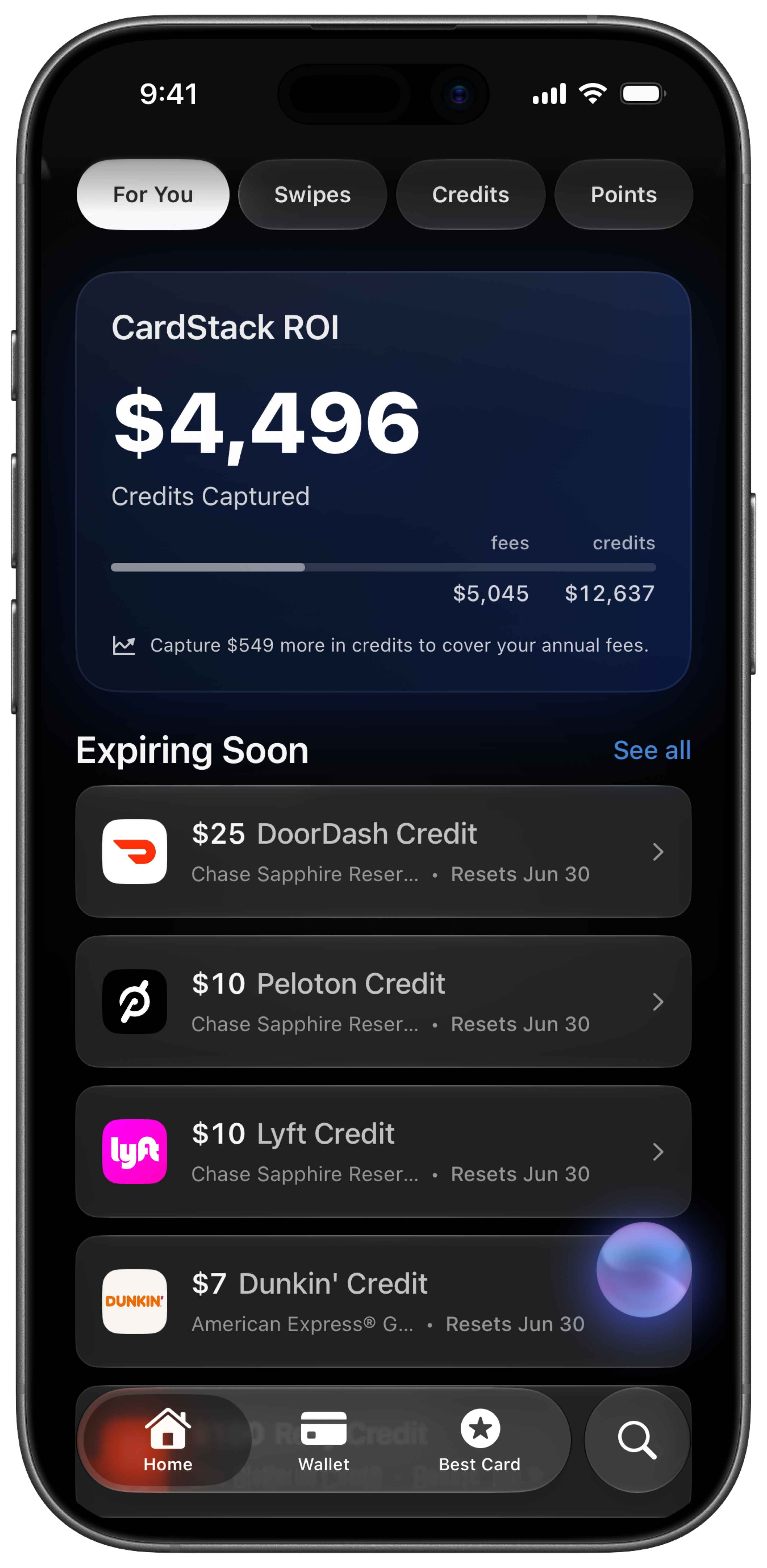
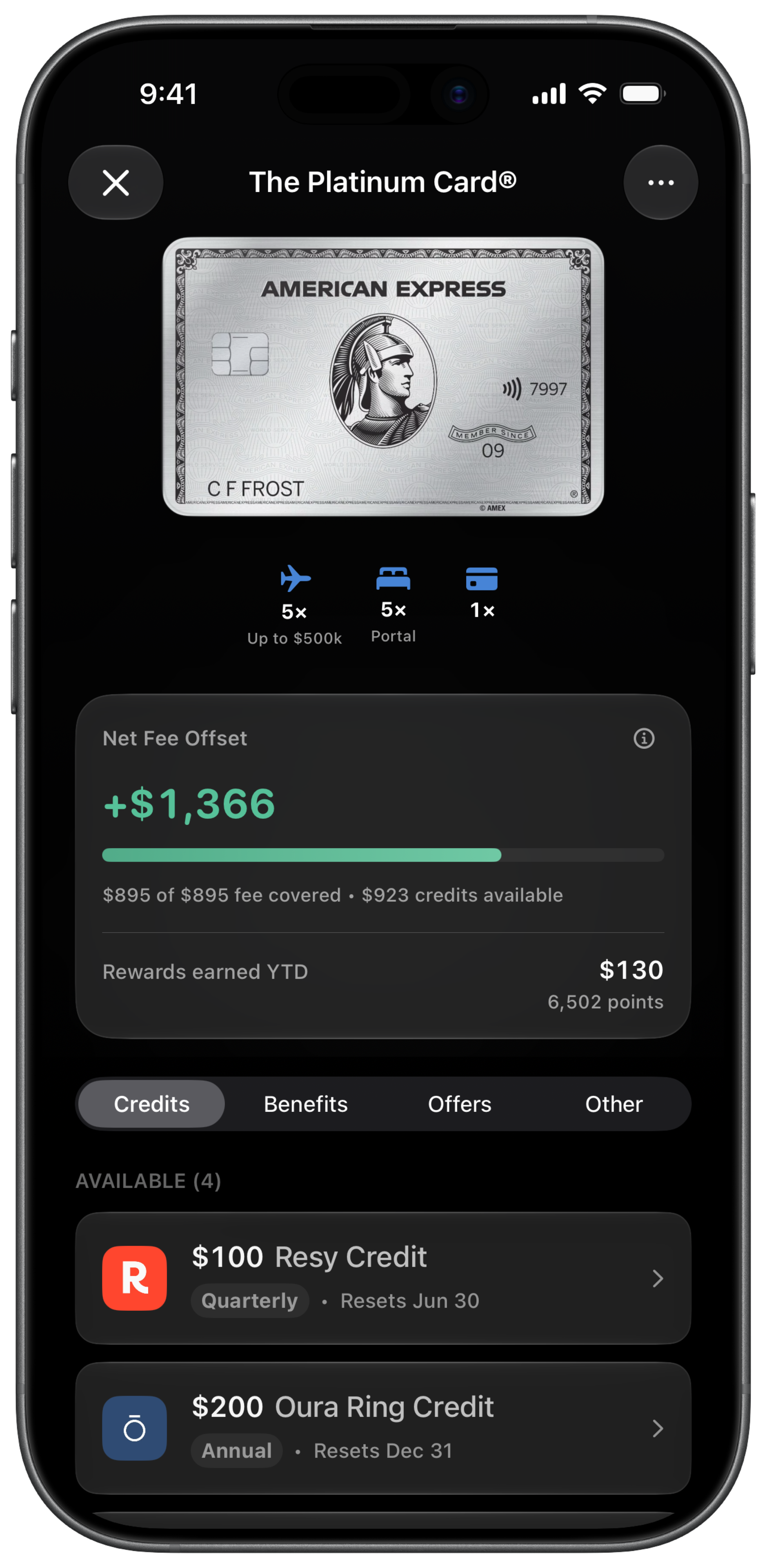
CardStack is a third option, not the focus of this MaxRewards vs Kudos comparison. I built it for the premium-card problem that kept annoying me: credits reset on different schedules, annual fees post whether you used the benefits or not, and the math gets fuzzy fast. CardStack is for iOS users who want automatic statement credit tracking, effective annual fee calculation, spending analysis, points tracking, and best-card recommendations. If you still want broader offer automation or browser shopping cash back, pair it with MaxRewards or Kudos.
The Case for Using More Than One
MaxRewards and Kudos are more complementary than they look. MaxRewards can be the card management layer. Kudos can be the checkout layer.
One reasonable pairing is MaxRewards for offer activation and card account aggregation, plus Kudos for browser recommendations and shopping cash back. Another is CardStack plus Kudos: CardStack tracks credits, effective fees, spending mistakes, points, and which card to use, while Kudos adds cash back and checkout autofill.
No single app does all of this perfectly. Start with the one that fixes the thing you keep missing. Add a second only when you can name the job it will do.
A Note on Privacy
MaxRewards and Kudos both handle sensitive financial data, but the trade-offs are different. MaxRewards’ privacy policy says it may collect information you provide about credit card products or issuer login information used in connection with the app. MaxRewards says it uses bank-level encryption, does not access card numbers or Social Security numbers, and does not sell user data.
Kudos’ privacy policy says it uses Plaid for transaction data, Spinwheel for credit profile information, payment processors for subscriptions, and AI model providers for anonymized insights. Its Chrome Web Store listing says the extension handles personal and financial/payment information, and that data is not sold outside approved use cases.
My rule here is simple: do not connect accounts until you understand what you are sharing. If issuer credentials make you uncomfortable, weigh that against MaxRewards. If transaction analysis, AI insights, and browser-extension data access make you uncomfortable, weigh that against Kudos.
Final Thoughts
I would not treat MaxRewards vs Kudos as a single-tool decision. MaxRewards is the better first stop if your wallet feels scattered across issuer accounts, offers, balances, bills, benefits, and rewards. Kudos is the better first stop if your mistakes happen while shopping and you want a free tool at checkout.
If I were choosing between the two, I would start with the mistake that costs me the most money. Missing issuer offers points toward MaxRewards. Using the wrong card online points toward Kudos. Paying annual fees without knowing whether credits offset them points toward CardStack, or at least an annual fee framework.
The best setup is the one you will keep using. A rewards app that saves $200 in theory but adds another dashboard you ignore is not helping. Pick the tool that removes the most friction, then add another only when you can name the gap.
FAQ
Is MaxRewards better than Kudos for offer activation?
MaxRewards is usually the better pick if offer activation is the main thing you care about. MaxRewards is built around issuer syncing, offer activation, bonus category automation, bills, balances, and card benefits. Kudos also activates card-linked offers, but its clearest strength is still the shopping and checkout experience.
Is Kudos better than MaxRewards for online shopping?
Kudos is better than MaxRewards for most online shopping use cases. Kudos started as a browser-first smart wallet, so checkout recommendations, card autofill, Boost cash back, and offer surfacing feel central. MaxRewards has a browser extension too, but online shopping is more clearly Kudos’ home turf.
Which app is cheaper, MaxRewards or Kudos?
Kudos is cheaper if the free tier solves your problem. As of 2026, MaxRewards Gold starts at $108/year billed annually, while Kudos Premium is listed around $71.95-$71.99/year, $14.99/month, or $240 lifetime. I would still check each checkout screen before subscribing because rewards apps change pricing more often than people expect.
Is MaxRewards vs Kudos the right comparison for premium credit card credits?
MaxRewards vs Kudos is not the comparison I would start with if your real problem is premium-card credits. MaxRewards and Kudos can track benefits, but neither is centered on automatically calculating effective annual fees from credits actually used. CardStack is the better fit for iOS users who want automatic credit tracking and annual fee math.
Does MaxRewards or Kudos work better on Android?
Both MaxRewards and Kudos support Android as of 2026. MaxRewards is the better Android fit if you want credit card account management and issuer offer automation. Kudos is the better Android fit if you want shopping rewards, cash back, bill negotiation, subscription tools, and a browser-connected wallet.
Can I use MaxRewards and Kudos together?
Yes, MaxRewards and Kudos can work together because they do not solve the exact same problem. MaxRewards can be the card management layer for issuer accounts, offers, benefits, bills, and balances. Kudos can be the checkout layer for browser recommendations, autofill, and shopping cash back.
Is Kudos safer than MaxRewards for bank credentials?
Kudos and MaxRewards use different data models, so “safer” depends on what you are comfortable sharing. MaxRewards references issuer login information and explains how it encrypts credentials. Kudos references Plaid, Spinwheel, transaction data, credit profile data, and AI-powered insights. I would not connect either one until you are comfortable with that trade-off.
Related Articles
Get $500+ a year back from your premium cards.
CardStack tracks every credit, offer, and renewal across your wallet so unused perks do not slip past their reset dates.




CardStack Insiders
Newsletter
Card news, standout deals, and product updates—straight to your inbox.
By signing up, you agree to ourTermsandPrivacy Policy. Unsubscribe anytime.
Read Next
Related articles