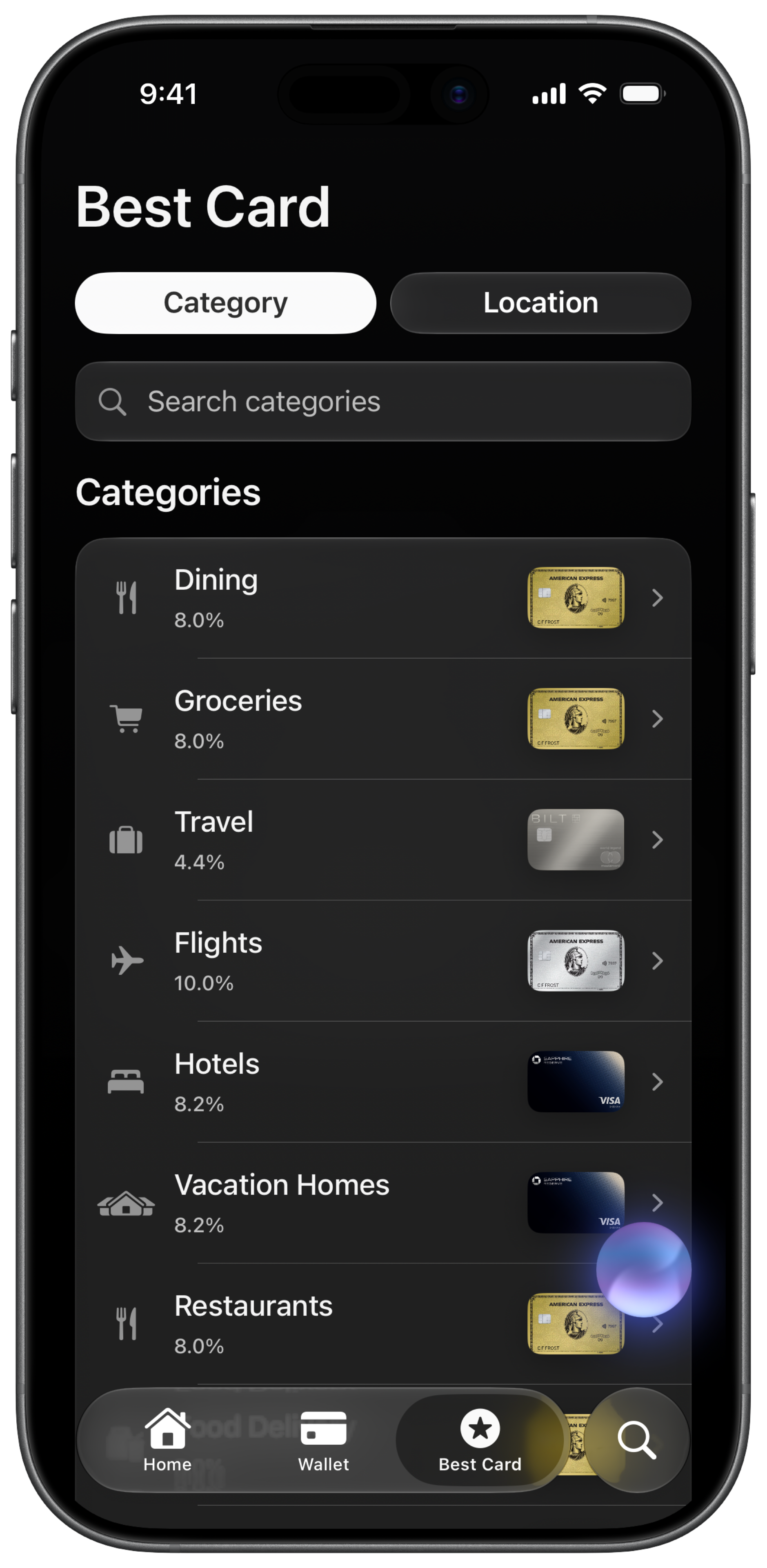
A restaurant charge lands on the catch-all card while the Gold, earning 4x on dining, sits in the same wallet. Choosing from memory at the register makes that swap routine.
How do you choose the right card manually?
- Learn each card's bonus categories. Write down which card earns extra on dining, groceries, travel, gas, and online shopping. The Amex Gold earns 4x on dining. The Chase Sapphire Reserve earns 3x on dining and 4x on flights and hotels booked direct. Your no-fee card earns 1x on everything else.
- Track rotating categories quarterly. Chase Freedom and Discover cards change 5% categories every quarter. Activate them in the issuer app and update your mental map (or notes) when the calendar flips.
- Decide at the register. When you tap to pay, recall which card wins for this merchant category. At a restaurant, Gold. At a gas station, maybe your rotating category card. At a random store, your catch-all.
- Adjust for merchant coding. Issuers categorize merchants differently. A purchase at a grocery store inside a Walmart may code as Walmart, not groceries. Your category guess can be wrong.
- Expect an error rate. Memory-based selection has a real error rate, especially past two or three cards. Issuers price bonus categories knowing a share of spend lands on the wrong card.
- Repeat the mental math every time. Every purchase is a new decision. There is no running total of what you already lost from picking wrong.
How does CardStack tell you which card to use?
CardStack Best Card estimates the highest value card for a purchase using your wallet, category bonuses, and point valuations. Open the app before you pay, or use the Chrome and Safari extension to see a recommendation while you shop online.
Best Card considers context like merchant category and location. It is not perfect (merchant coding varies), but it beats guessing from memory when you carry four or five cards. Add your cards on the free tier to build your wallet.
The browser extension also surfaces the best card on shopping sites. Extension features require CardStack+. The in-app Best Card recommendation is part of the CardStack iOS experience. For category picks by spend type, see best cards by category and the which card should I use guide.
Manual vs CardStack at a glance
| Feature | Manual | CardStack |
|---|---|---|
| Knowledge required | Memorize every card's categories and quarterly rotations | Add your cards once; app holds the rules |
| Decision point | At the register, from memory | In the app or extension before checkout |
| Rotating categories | Activate and remember each quarter | CardStack tracks your cards; you still activate rotations in issuer apps |
| Best for | One or two cards with simple bonus categories | Three or more cards where category bonuses overlap |
| Wrong-card risk | High with 3+ cards | Lower with a live recommendation |
What is automatic and what is not
The browser extension best-card widget requires CardStack+. In-app Best Card works with your CardStack wallet on iPhone when you add your cards on the free tier.
CardStack does not activate Chase Freedom or Discover rotating categories for you. You still enroll quarterly bonuses in the issuer app. Best Card uses the categories you have active.
Memorizing categories is enough if you carry one or two cards with clear bonuses. CardStack helps when your wallet has overlapping category winners.
Frequently asked questions
How does CardStack pick the best card?
CardStack compares your cards using category bonus rates and point valuations you can adjust. It estimates dollar value per purchase type and recommends the highest expected return.
Does Best Card work in physical stores?
Open the CardStack app before you pay and check Best Card for the merchant or category. Location context can improve recommendations when enabled.
Can the extension tell me which card on Amazon?
Yes, with CardStack+ and the paired extension. The extension can surface a recommendation on supported shopping sites.
Is Best Card the same as a wallet setup guide?
No. A wallet setup guide tells you which cards to carry long term. Best Card tells you which card to use for this purchase right now.
Do I need to link my bank for Best Card?
No. Best Card uses the cards in your CardStack wallet and their known bonus categories. Plaid is for spending analysis and credit detection, not for Best Card recommendations.
Related guides
Download CardStack on iPhone to see which card earns the most before you tap to pay.