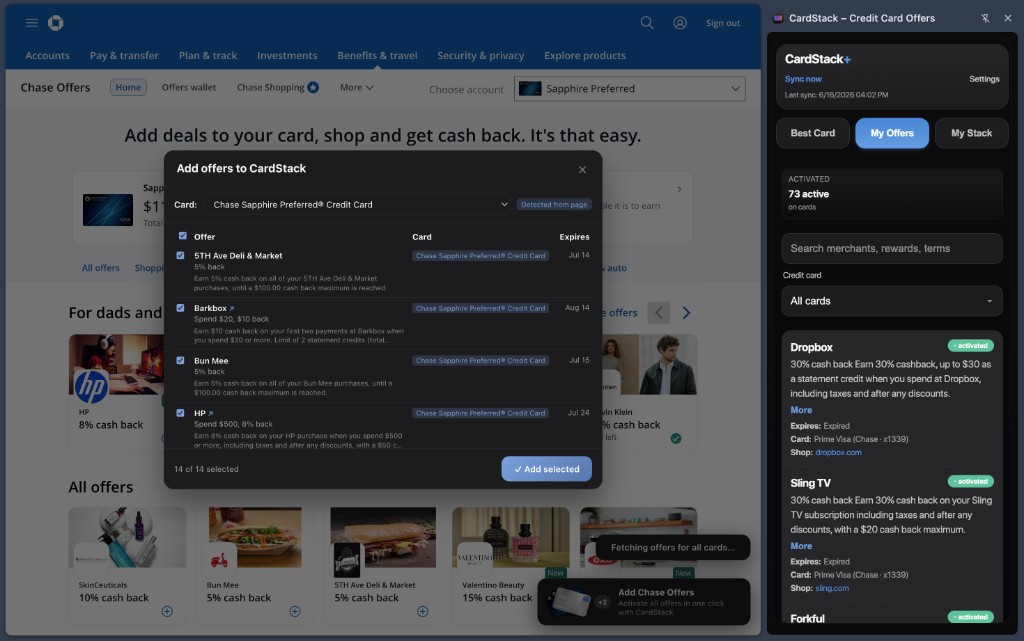
Chase Offers work like Amex: you must activate each deal before you spend. Forget once and the credit never posts.
How do you add Chase offers manually?
- Sign into Chase. Open the Chase mobile app or log in at chase.com with the account that holds your cards.
- Open Chase Offers for a card. Chase Offers live inside each card's account view. Select the card, then open the Offers or Deals section.
- Activate each offer. Tap or click to add or activate each offer you want. Chase typically requires explicit enrollment before qualifying spend.
- Repeat for every Chase card. A Sapphire Reserve and a Freedom Flex each have their own offer lists. You need to check both.
- Use the enrolled card at the merchant. Pay with the card that has the offer activated. Meet minimum spend and merchant rules before the expiration date.
- Confirm the credit on your statement. Chase usually posts the credit as a separate line item after the purchase clears. Allow a few days.
How does CardStack add Chase offers for you?
CardStack's Chrome and Safari extension works on Chase pages after you log in. Visit Chase Offers while signed in and enroll selected deals in batch.
Setup requires CardStack+: install the extension, pair it with your CardStack account using the 6-digit code, then browse Chase Offers as you normally would.
Chase and Amex are the only issuers CardStack enrolls offers for. See the auto-add offers feature page for pairing steps.
Manual vs CardStack at a glance
| Feature | Manual | CardStack |
|---|---|---|
| Steps per session | Open each Chase card, activate every offer individually | Sign into Chase, open Offers, confirm batch enrollment in the extension |
| Time (typical) | 5 to 10 minutes per week across cards | A few minutes once paired |
| What you must remember | Check Offers on every Chase card before you shop | Visit Chase Offers pages; extension handles activation clicks |
| Best for | One Chase card, occasional offer checks | Multiple Chase cards with regular offer volume |
| Subscription required | None | CardStack+ ($69.99/year or $7.99/month after 7-day trial) |
What is automatic and what is not
Batch Chase offer enrollment requires CardStack+ and the paired browser extension. The free tier does not include extension features.
You still log into Chase yourself. CardStack does not store your Chase password. Offer automation is Amex and Chase only.
If you have one Chase card and check Offers weekly, manual activation is fine. CardStack helps when offer volume across cards adds up.
Frequently asked questions
Does Chase let you add all offers at once?
Chase does not provide a single activate-all control in the standard Offers UI. You add or activate offers individually per card. A browser extension like CardStack can enroll multiple selected offers in one session after you log in.
Which Chase cards have Chase Offers?
Most consumer Chase cards show Chase Offers, including Sapphire, Freedom, and Ink products. Availability can vary by card and account. Check the Offers section for each card in your wallet.
Do I need to link my bank for Chase offer enrollment?
No. The extension enrolls offers on Chase's website or app pages while you are logged in. Plaid bank linking is separate and used for credit detection and spending analysis on CardStack+.
Can CardStack add Chase Freedom rotating category bonuses?
No. CardStack enrolls merchant-specific Chase Offers, not quarterly 5% category activation on Freedom cards. You still activate rotating categories in the Chase app yourself.
Is the CardStack extension available on iPhone?
Yes, via Safari. Install CardStack from the App Store, enable the Safari extension in iOS Settings, pair it with your account, then use Safari to log into Chase and open Offers.
Related guides
Download CardStack on iPhone to batch-enroll Chase Offers with the CardStack+ browser extension.